













About Ludo King™
Ludo King™ is a classic board game played between friends and family. Play the Parchisi dice game of kings — recall your childhood! Ludo King™ is a cross-platform multiplayer game that supports Desktop, Android, iOS, and Windows Mobile platforms simultaneously. The game also supports an offline mode where players can play against the computer or in local multiplayer (pass-and-play). Ludo King™ is a favorite of Bollywood superstars and Indian cricket players. Play this dice game — it's one of the best casual board games.
How to top-up Ludo King Coins or Gems?
- Select the Coins or Gems denomination.
- Enter your User ID.
- Click the "Buy Now" button and Choose your payment method.
- Once payment made, Ludo King Coins or Gems will be credited to your account shortly.
How to find Ludo World User ID?
- Log in to the game using your account.
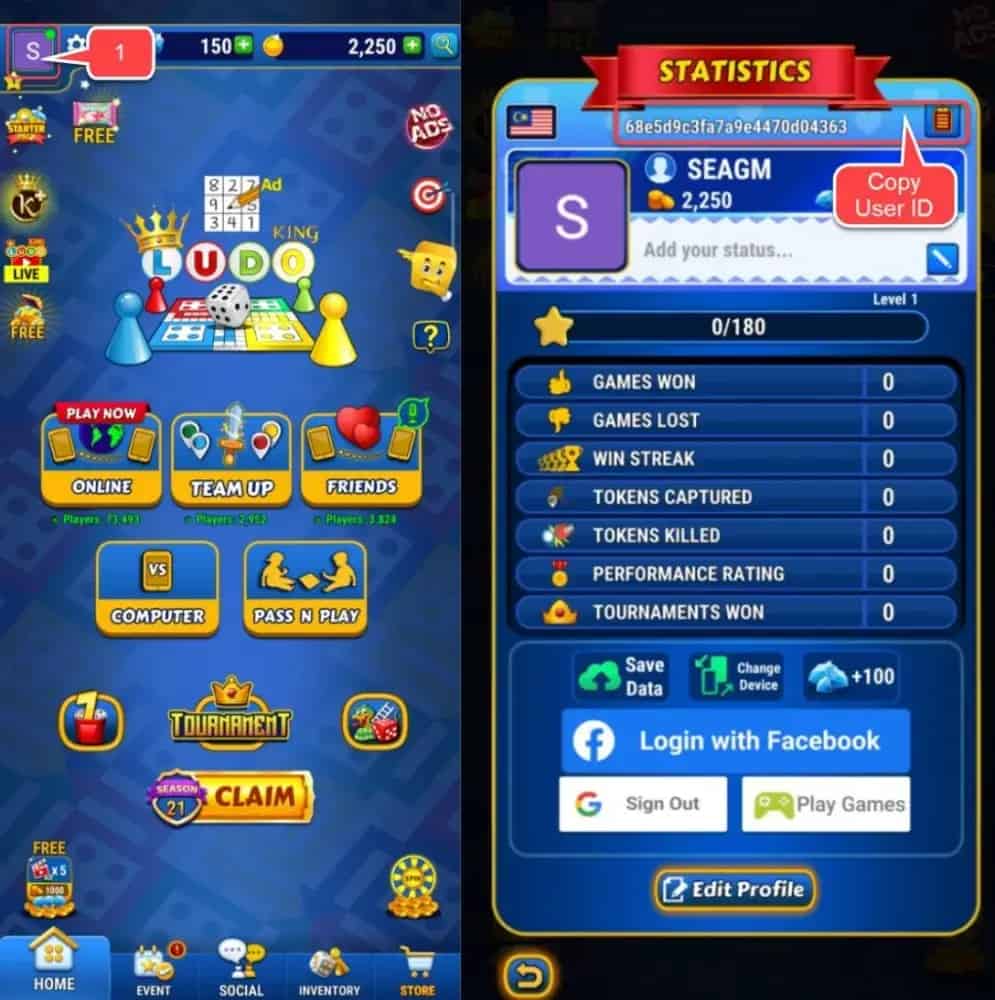
- Tap for the "Avatar" icon. It's positioned at the Top-left corner of the game screen.
- Your Ludo World User ID will be displayed.
Frequently Asked Questions (FAQ)
1) Is this Ludo King top up a direct top-up (ID top-up) or login top-up?
This is a direct top-up. You only need to enter your Ludo King User ID (UID). No account login is required.
2) Do I need to provide my Ludo King password?
No. A legitimate direct top-up should never ask for your password.
3) What can I top up on this page?
You can top up Coins, Gems, and some combo packs (depending on the denomination options shown on the page).
4) Where can I find my Ludo King User ID (UID)?
In the game:
- Log in to your account
- Tap your Avatar (usually top-left)
- Your User ID/UID will be displayed
5) How do I top up Ludo King on TOPUPlive?
- Select Coins/Gems denomination
- Enter your UID
- Click Buy Now and choose payment method
- After payment, the Coins/Gems will be credited shortly
6) How long does delivery take?
Most orders are processed quickly (often within minutes). Delivery time may vary due to payment verification or peak traffic.
7) What if I entered the wrong UID?
Wrong UID may cause failure, delay, or delivery to the wrong account. Please double-check before paying. If you notice a mistake, contact Online customer service immediately with your order number.
8) What if I paid but didn’t receive Coins/Gems?
- Confirm UID is correct
- Confirm payment success
- Restart the game and check again
- Contact Online customer service with order number + UID + payment proof
9) What payment methods are supported?
Available payment methods depend on your region and what’s shown at checkout (cards, PayPal, local methods, etc.).
10) Can I request a refund?
Refund eligibility depends on order status and policy. For failed orders or duplicate charges, contact Online customer service with your order number and proof.
 No data available